Affichage des articles dont le libellé est Visual studio. Afficher tous les articles
Affichage des articles dont le libellé est Visual studio. Afficher tous les articles
mercredi, mars 28, 2012

mardi, mars 14, 2006
Activate IntelliSense on "Skin" files
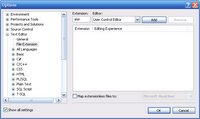
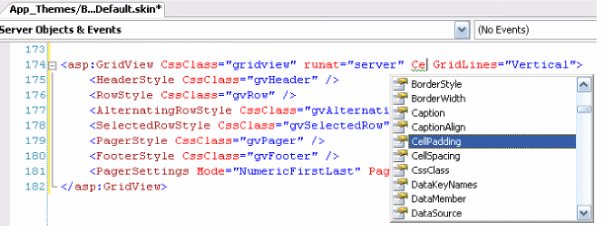
with Visual studio 2005 IntelliSense is everywhere, to activate it on skin files, just go to Tools > Options > Text Editor > File Extension, enter skin in the extention textbox, and choose User Control Editor as editor :
then enjoy it :


then enjoy it :
vendredi, décembre 16, 2005
i have put an Icon named "MyIcon" in my winform application ressources, by using the project proporty designer. Now i will put it in the form icon propoerty at the run time using code :
using System.Resources;
[...]
ResourceManager rm = new ResourceManager("MyNamespace", this.GetType().Assembly);
MyForm.Icon = (Icon)rm.GetObject("MyIcon");
using System.Resources;
[...]
ResourceManager rm = new ResourceManager("MyNamespace", this.GetType().Assembly);
MyForm.Icon = (Icon)rm.GetObject("MyIcon");
jeudi, novembre 17, 2005
VS 2005 Web Deployment Projects
Download it from Here
Some advantages of Web Deployment Project :
1) You can now generate a single named assembly for all pages + classes in your web project (for example: MyCompany.MyWebApp.dll). Alternatively, you can also now optionally generate a separate named assembly for each directory of pages/controls in your project (for example: MyCompany.MyWebApp.SubFolder1.dll and MyCompany.MyWebApp.SubFolder2.dll). This later option is particularly useful for large content web-apps where you would like the ability to incrementally patch code updates.
2) You can now use MSBuild to define pre and post build rules, exclude folders from building, automatically create IIS vdirs and site mappings, add custom assembly versioning information, and add any custom MSBuild task you want to your build process. VS 2005 Web Deployment Project stores all of its settings inside an MSBuild based project-file (XML).
3) The ability to define and use custom build-configurations inside Visual Studio, and define per-build configuration options. In addition to using the built-in “debug” and “release” configurations, for example, you could define custom build configurations like “staging”. You can then vary your web deployment MSBuild tasks and actions based on these.
4) The ability to customize and modify a web application’s web.config file at deployment. There is now IDE support for changing values likes connectionstrings or app-settings as part of the build process. You can also vary these values based on the VS build configuration – so for example you could have one set of connectionstrings that you use for development (when you have the build configuration set to “debug”), and then have them modified as part of the build-process to your test/staging or production databases when you choose a “staging” or “release” build configuration in the IDE.
Example Walkthrough of using a VS 2005 Web Deployment Project
(Scott's example)
Some advantages of Web Deployment Project :
1) You can now generate a single named assembly for all pages + classes in your web project (for example: MyCompany.MyWebApp.dll). Alternatively, you can also now optionally generate a separate named assembly for each directory of pages/controls in your project (for example: MyCompany.MyWebApp.SubFolder1.dll and MyCompany.MyWebApp.SubFolder2.dll). This later option is particularly useful for large content web-apps where you would like the ability to incrementally patch code updates.
2) You can now use MSBuild to define pre and post build rules, exclude folders from building, automatically create IIS vdirs and site mappings, add custom assembly versioning information, and add any custom MSBuild task you want to your build process. VS 2005 Web Deployment Project stores all of its settings inside an MSBuild based project-file (XML).
3) The ability to define and use custom build-configurations inside Visual Studio, and define per-build configuration options. In addition to using the built-in “debug” and “release” configurations, for example, you could define custom build configurations like “staging”. You can then vary your web deployment MSBuild tasks and actions based on these.
4) The ability to customize and modify a web application’s web.config file at deployment. There is now IDE support for changing values likes connectionstrings or app-settings as part of the build process. You can also vary these values based on the VS build configuration – so for example you could have one set of connectionstrings that you use for development (when you have the build configuration set to “debug”), and then have them modified as part of the build-process to your test/staging or production databases when you choose a “staging” or “release” build configuration in the IDE.
Example Walkthrough of using a VS 2005 Web Deployment Project
(Scott's example)
mercredi, novembre 16, 2005
WebBrowser control
Visual studio 2005 includes a new control named the WebBrowser control. The WebBrowser control is a wrapper of the IE ActiveX browser control. The biggest benefit of the WebBrowser control is ease of use. It allows an application to host html content using a simple managed object model without the need to do any interop with unmanaged code. At design time you can easily set the WebBrowser control’s URL property. Programmatically you can perform all of the standard operations you could with the ActiveX browser control. For example, navigating the browser control and hooking navigation events. The WebBrowser control also supports several additional pieces of functionality such as enabling/disabling the browser context menu & restricting what the hosted HTML page can do.
You can get samples fromMSDN site
You can get samples fromMSDN site
mardi, novembre 15, 2005
My experience VS 2005 beta2
Among the problems that I met during my experiment of Visual sudio 2005 beta 2, and which were fortunately corrected in the final version left in November 2005:
- The possibility of bind DataTable directly to a combo box for example:
Combobox.datasource = myDataTable
- the use of some COM object, in particular office Web component (owc), in the version beta I could not insert the control on my Windows form and start to work.
- As for the designer, the errors toolbar annoyed me with its noninteraction with my mouse
- The possibility of bind DataTable directly to a combo box for example:
Combobox.datasource = myDataTable
- the use of some COM object, in particular office Web component (owc), in the version beta I could not insert the control on my Windows form and start to work.
- As for the designer, the errors toolbar annoyed me with its noninteraction with my mouse
lundi, août 01, 2005
Get the list of tables in a Database
My goal is to extract the list of tables in a given data base, in truth one can carried out that with a simple request Sql, it is enough to carry out that:
But I do not find interesting, in a Windows or Web application , to process in this way, whereas we can do it differently, just by taking the connexion schema, it is more flexible and more elegant:
private DataTable GetListTablesFromDB()
{
SqlConnection conn = null;
try
{
conn = new SqlConnection(“My connection string here!”);
conn.Open();
DataTable schemaTable = conn.GetSchema(“Tables”);
return schemaTable;
}
catch (SqlException ex)
{
throw ex;
}
finally
{
conn.Close();
}
return null;
}
In the example precede I used a Sql connection, that goes only with the version ADO.net 2.0, if you use a previous version, you should then use a OleDb connection:
private DataTable GetListTablesFromDB ()
{
string strConn = "Provider=SQLOLEDB;Data Source=localhost;
Initial Catalog=Northwind;User ID=sa;Password=;";
OleDbConnection conn = null;
try
{
conn = new OleDbConnection(strConn);
conn.Open();
DataTable schemaTable = conn.GetOleDbSchemaTable(OleDbSchemaGuid.Tables, new Object[] {null, null, null, "TABLE"});
return schemaTable;
}
catch (OleDbException ex)
{
Trace.Write(ex.Message);
Response.Write(ex.Message);
}
finally
{
conn.Close();
}
return null;
}
Then we can post this list of tables in a combobox, for example :
private void TablesListFill()
{
try
{
this.TablesList.Items.Clear();
DataTable dtTablesList = this.GetListObjectFromDB("Tables");
for (int i = 0; i this.TablesList.Items.Add(dtTablesList.Rows[i][2].ToString());} catch (System.Exception ex) { throw ex; } }
But I do not find interesting, in a Windows or Web application , to process in this way, whereas we can do it differently, just by taking the connexion schema, it is more flexible and more elegant:
private DataTable GetListTablesFromDB()
{
SqlConnection conn = null;
try
{
conn = new SqlConnection(“My connection string here!”);
conn.Open();
DataTable schemaTable = conn.GetSchema(“Tables”);
return schemaTable;
}
catch (SqlException ex)
{
throw ex;
}
finally
{
conn.Close();
}
return null;
}
In the example precede I used a Sql connection, that goes only with the version ADO.net 2.0, if you use a previous version, you should then use a OleDb connection:
private DataTable GetListTablesFromDB ()
{
string strConn = "Provider=SQLOLEDB;Data Source=localhost;
Initial Catalog=Northwind;User ID=sa;Password=;";
OleDbConnection conn = null;
try
{
conn = new OleDbConnection(strConn);
conn.Open();
DataTable schemaTable = conn.GetOleDbSchemaTable(OleDbSchemaGuid.Tables, new Object[] {null, null, null, "TABLE"});
return schemaTable;
}
catch (OleDbException ex)
{
Trace.Write(ex.Message);
Response.Write(ex.Message);
}
finally
{
conn.Close();
}
return null;
}
Then we can post this list of tables in a combobox, for example :
private void TablesListFill()
{
try
{
this.TablesList.Items.Clear();
DataTable dtTablesList = this.GetListObjectFromDB("Tables");
for (int i = 0; i this.TablesList.Items.Add(dtTablesList.Rows[i][2].ToString());} catch (System.Exception ex) { throw ex; } }
Inscription à :
Articles (Atom)