An index server is limited to 50 millions documents, to support more documents you can have multiple farms. But the problem comes with relevance !
let's read Russ Houberg's SharePoint Blog article (very nice)
Affichage des articles dont le libellé est SharePoint. Afficher tous les articles
Affichage des articles dont le libellé est SharePoint. Afficher tous les articles
mardi, janvier 29, 2008

mardi, avril 17, 2007
Some SharePoint technical sites
Trying to become stronger on sharepoint stuff, I was navigating over Interne, here is some nice site:
SharePoint Team Blog
WSS 3.0 how-to's
For Developers (MSDN Dev Center)
For IT Pros (TechNet TechCenter)
SharePoint Community Portal (new!)
MOSS 2007 Migration Center
SharePoint Community Search
MOSS 2007 how-to's
OPML for recommended blogs and resources
List of SharePoint 2007 Books
SharePoint Q&A and Discussion Forums
10 Essential Resources for SharePoint Developers
Records Management Team Blog
SharePoint Community Search
Knowledge Network Team Blog
SharePoint Community Search
SharePoint Q&A and Discussion Forums
SharePoint Team Blog
WSS 3.0 how-to's
For Developers (MSDN Dev Center)
For IT Pros (TechNet TechCenter)
SharePoint Community Portal (new!)
MOSS 2007 Migration Center
SharePoint Community Search
MOSS 2007 how-to's
OPML for recommended blogs and resources
List of SharePoint 2007 Books
SharePoint Q&A and Discussion Forums
10 Essential Resources for SharePoint Developers
Records Management Team Blog
SharePoint Community Search
Knowledge Network Team Blog
SharePoint Community Search
SharePoint Q&A and Discussion Forums
mercredi, novembre 01, 2006
Easy Web User Controls for SharePoint v3
SmartPart v3, also known as the “SmartPart for SharePoint 2007” has been released. This is a container WebPart that can host any ASP.NET 2.0 Web User Control (ASCX).

Download the webpart from GotDotNet

Download the webpart from GotDotNet
jeudi, septembre 21, 2006
MOSS 2007 configuration failed
After installing MOSS beta 2, I launch the configuration wizzard to create config Databases and built IIS sites, but it failed with this error notification :
Task configdb has failed with an unknown exception Exception: Microsoft.SharePoint.SPException: The language is not supported on the server. ---> System.Runtime.InteropServices.COMException (0x8102005E): The language is not supported on the server. at Microsoft.SharePoint.Library.SPRequestInternalClass.CreateSite(Guid gApplicationId, String bstrUrl, Int32 lZone, Guid gSiteId, Guid gDatabaseId, String bstrDatabaseServer, String bstrDatabaseName, String bstrDatabaseUsername, String bstrDatabasePassword, String bstrTitle, String bstrDescription, UInt32 nLCID, String bstrWebTemplate, String bstrOwnerLogin, String bstrOwnerName, String bstrOwnerEmail, String bstrSecondaryContactLogin, String bstrSecondaryContactName, String bstrSecondaryContactEmail, Boolean bADAccountMode, Boolean bHostHeaderIsSiteName)...
After looking arround the net, it was a default language conflict, It can be resolved but adding a registry entry, so have fun with the new MS Portal : (just copy the code on a .reg file and execute it!)
Windows Registry Editor Version 5.00 [HKEY_LOCAL_MACHINE\SOFTWARE\Microsoft\Shared Tools\Web Server Extensions\12.0\ServerLanguage] "1033"=""
vendredi, mai 12, 2006
SharePoint "V3.0" Features
UI / UX
• Built-in breadcrumb trails, Quicklaunch on every page, Tree-view navigation of sites built-in
• Pages will derive from “master pages“, meaning that you could re-skin an entire SharePoint site by modifying just one template file
• More professional out of the box themes
• FrontPage can directly edit each site's CSS file(s)
• Workflow built-in all over SharePoint, with tight integration with Outlook 12 tasks, FrontPage-based workflow creation, some browser-based workflow creation
• Individual documents can have document-specific workflows
• Item-level security on lists and libraries
• FrontPage has evolved further into a SharePoint designer tool (I read that as: the only SharePoint designer tool), and apparently, ghosted/unghosted pages won't be a problem any longer
• Recycle bin with user and administrator restore features for document libraries and list items
• InfoPath forms can be filled out with only a browser when published as (to?) a SharePoint site (even with FireFox)
• Customizable and extensible search (and search API), including “did you mean“-type search term corrections (Update: It appears this is an SPS vNext feature)
• Lists can be viewed on mobile devices
• The UI is “security sensitive“, meaning that you won't see the button to add an item unless you have the rights to add an item
• Lists support multi-value lookups
• Gantt charts for “Project Tasks“ list type
• Alerts are considerably more powerful, support more filters/RSS integration
• AJAX (Atlas) used generously throughout UI for a better cross-browser experience
• “Welcome menu“ for users (login/logout/change user/edit profile/etc links in one place)
• Apparently, unghosted pages will be cached better, and will remain attached to their “Master Page“, negating much of the performance/caching problem there is today (that didn't seem all that earth shattering, actually)
• Document policies (retention period, archiving rules, audit logs)
• Folders supported in any list (not sure why that was even on their radar)
• Version history can be configured to keep last n records
• Sites' UI can be localized without deploying a new site (multilingual UI)
Integration
• All lists and libraries have RSS feeds, and each list's feed can be customized to include whatever fields you'd like
• Event list RSS feeds include iCal files as enclosures
• Each site has a master “aggregating“ RSS feed
• Outlook 12 can perform 2-way online/offline syncronization of the following list types:
o Contacts
o Events
o Tasks
o Discussion Lists
o Document Libraries (!)
• Discussion lists can create their own e-mail alias in Active Directory, allowing you to e-mail that alias to automatically archive that e-mail (and its attachments) to a SharePoint discussion list
• ALL lists and libraries have version history capability, and only “diffs“ are stored (differences from one change to the next)
• Access treats SharePoint sites as honest-to-goodness data sources
Developer and Administrator-oriented news
• Existing web parts will “just work“ in the new SharePoint web part page framework
• Site definitions/templates will ship in the box for blogs and wikis (blogs can be built directly on your “My Site“!)
• All lists and libraries will have synchronous event handlers (not sure how these work with other interfaces to SharePoint data, like OM, WEBDAV, SOAP, etc., if the event handler has to raise an exception)
• List/library version history is exposed programmatically by way of the OM
• Multiple “content types” (sets of metadata, or “metadata templates“, if you will) for document libraries and lists, that include view information, workflows, bound events.
• FrontPage can edit workflows
• Business Data Catalog (datasource catalog on steroids, apparently) -- What's new is that you can use members of this catalog as fields in lists; in other words, a list can have a lookup that's bound to a SQL Server table, a web service, or any other source that exists in the Business Data Catalog
• XML Schema Documents (XSDs) will be made available for many of the CAML-based ghosted template/config files
• The “STSFLTR“ ISAPI filter is gone, SharePoint sites are “native“ ASP.NET 2.0 sites.
• You'll still need to use the SmartPart (or something of its ilk) to use ASP.NET 2.0 web parts on your SharePoint sites
• Form templates are better defined in XML (they're there now, just without any real easy way to modify them)
• Less XML-based configuration, more UI-based “features“ that can be turned on/off or modified to webs, sites, IIS virtual servers or entire server farms with one click
• SPTimer is given a boost, allowing you to write your own plugins that get executed at their own defined schedules/criteria/etc
• UI toolbars/menus/etc can easily be modified, with those modifications also “security sensitive“
• SPDataSource class, SharePoint sites exposed using IDataSource (sweet)
• SPGridView, a SharePoint-look-alike DataGrid (with sort/filter/group/etc baked right in)
• SPDataQuery class, which uses CAML (set as a property, why not a param to a method?) does cross-site searches, easily binds to SPGridViews or other ASP.NET databound controls
• SharePoint Web Parts' base class is a Web Control (still no designer, though; you'll need to use SmartPart for that)
• v2.0 -> v3.0 is considered an “upgrade“, not a “migration“
• Security providers supported, no more AD authentication requirements (forms-based security, anyone?)
• “Feature Definitions“ (which sounds an awful lot like existing definition configuration types, but expanded a bit) allow you to enable/disable kits of functionality, i.e. a “Feature Definition“ that contains lists, web parts, event handlers, content types (those metadata “templates“ mentioned in another part of this post)
• Custom column indexes in lists
• Trusted event handlers can easily impersonate identities
• Policies can be set for content expiration based on values/metadata/workflow status for documents, and content can be moved to recycle bin (or, one would assume, deleted or archived) based on the selected metric
• Built-in breadcrumb trails, Quicklaunch on every page, Tree-view navigation of sites built-in
• Pages will derive from “master pages“, meaning that you could re-skin an entire SharePoint site by modifying just one template file
• More professional out of the box themes
• FrontPage can directly edit each site's CSS file(s)
• Workflow built-in all over SharePoint, with tight integration with Outlook 12 tasks, FrontPage-based workflow creation, some browser-based workflow creation
• Individual documents can have document-specific workflows
• Item-level security on lists and libraries
• FrontPage has evolved further into a SharePoint designer tool (I read that as: the only SharePoint designer tool), and apparently, ghosted/unghosted pages won't be a problem any longer
• Recycle bin with user and administrator restore features for document libraries and list items
• InfoPath forms can be filled out with only a browser when published as (to?) a SharePoint site (even with FireFox)
• Customizable and extensible search (and search API), including “did you mean“-type search term corrections (Update: It appears this is an SPS vNext feature)
• Lists can be viewed on mobile devices
• The UI is “security sensitive“, meaning that you won't see the button to add an item unless you have the rights to add an item
• Lists support multi-value lookups
• Gantt charts for “Project Tasks“ list type
• Alerts are considerably more powerful, support more filters/RSS integration
• AJAX (Atlas) used generously throughout UI for a better cross-browser experience
• “Welcome menu“ for users (login/logout/change user/edit profile/etc links in one place)
• Apparently, unghosted pages will be cached better, and will remain attached to their “Master Page“, negating much of the performance/caching problem there is today (that didn't seem all that earth shattering, actually)
• Document policies (retention period, archiving rules, audit logs)
• Folders supported in any list (not sure why that was even on their radar)
• Version history can be configured to keep last n records
• Sites' UI can be localized without deploying a new site (multilingual UI)
Integration
• All lists and libraries have RSS feeds, and each list's feed can be customized to include whatever fields you'd like
• Event list RSS feeds include iCal files as enclosures
• Each site has a master “aggregating“ RSS feed
• Outlook 12 can perform 2-way online/offline syncronization of the following list types:
o Contacts
o Events
o Tasks
o Discussion Lists
o Document Libraries (!)
• Discussion lists can create their own e-mail alias in Active Directory, allowing you to e-mail that alias to automatically archive that e-mail (and its attachments) to a SharePoint discussion list
• ALL lists and libraries have version history capability, and only “diffs“ are stored (differences from one change to the next)
• Access treats SharePoint sites as honest-to-goodness data sources
Developer and Administrator-oriented news
• Existing web parts will “just work“ in the new SharePoint web part page framework
• Site definitions/templates will ship in the box for blogs and wikis (blogs can be built directly on your “My Site“!)
• All lists and libraries will have synchronous event handlers (not sure how these work with other interfaces to SharePoint data, like OM, WEBDAV, SOAP, etc., if the event handler has to raise an exception)
• List/library version history is exposed programmatically by way of the OM
• Multiple “content types” (sets of metadata, or “metadata templates“, if you will) for document libraries and lists, that include view information, workflows, bound events.
• FrontPage can edit workflows
• Business Data Catalog (datasource catalog on steroids, apparently) -- What's new is that you can use members of this catalog as fields in lists; in other words, a list can have a lookup that's bound to a SQL Server table, a web service, or any other source that exists in the Business Data Catalog
• XML Schema Documents (XSDs) will be made available for many of the CAML-based ghosted template/config files
• The “STSFLTR“ ISAPI filter is gone, SharePoint sites are “native“ ASP.NET 2.0 sites.
• You'll still need to use the SmartPart (or something of its ilk) to use ASP.NET 2.0 web parts on your SharePoint sites
• Form templates are better defined in XML (they're there now, just without any real easy way to modify them)
• Less XML-based configuration, more UI-based “features“ that can be turned on/off or modified to webs, sites, IIS virtual servers or entire server farms with one click
• SPTimer is given a boost, allowing you to write your own plugins that get executed at their own defined schedules/criteria/etc
• UI toolbars/menus/etc can easily be modified, with those modifications also “security sensitive“
• SPDataSource class, SharePoint sites exposed using IDataSource (sweet)
• SPGridView, a SharePoint-look-alike DataGrid (with sort/filter/group/etc baked right in)
• SPDataQuery class, which uses CAML (set as a property, why not a param to a method?) does cross-site searches, easily binds to SPGridViews or other ASP.NET databound controls
• SharePoint Web Parts' base class is a Web Control (still no designer, though; you'll need to use SmartPart for that)
• v2.0 -> v3.0 is considered an “upgrade“, not a “migration“
• Security providers supported, no more AD authentication requirements (forms-based security, anyone?)
• “Feature Definitions“ (which sounds an awful lot like existing definition configuration types, but expanded a bit) allow you to enable/disable kits of functionality, i.e. a “Feature Definition“ that contains lists, web parts, event handlers, content types (those metadata “templates“ mentioned in another part of this post)
• Custom column indexes in lists
• Trusted event handlers can easily impersonate identities
• Policies can be set for content expiration based on values/metadata/workflow status for documents, and content can be moved to recycle bin (or, one would assume, deleted or archived) based on the selected metric
mardi, juillet 12, 2005
Reporting Services WebParts for SharePoint

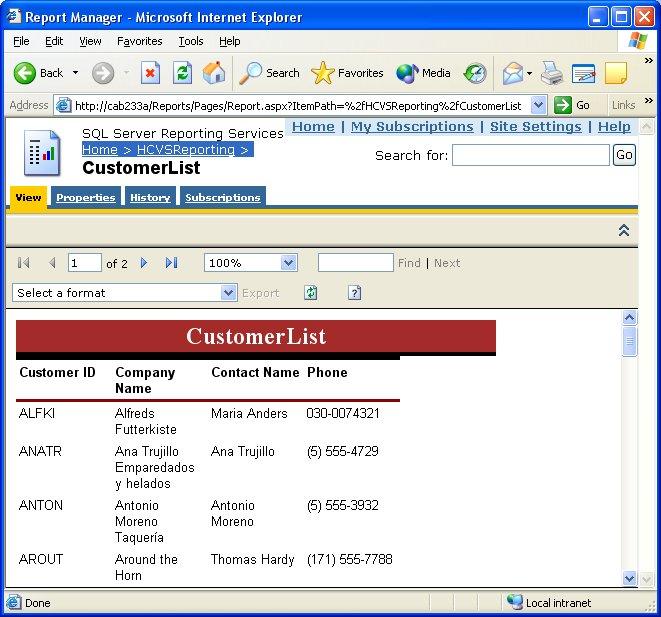
SQL reporting services is a powerfull solution for reporting, by default 2 virtual directory are created : ReportManager and Reports, that provide web access to the Reporting Server using the link :
You can also use the RS Web Service to generate reports, in case of windows form application for example.
One other way to present information on the Web is through Reporting services's WebParts, a Web Part is a component of a portal that displays specific information, and can be moved around the page during the design process.
You need to accomplish that an extended SharePoint services site or portal, and Reporting services service pack 2 installed.
Run the command : "C:\Program Files\Common Files\Microsoft Shared\web server extensions\60\BIN\stsadm.exe"-o addwppack -force –filename "C:\Program Files\Microsoft SQL Server\80\Tools\Reporting Services\SharePoint\RSWebParts.cab"
Then go to your SharePoint site, edit the page where you want to add the weparts, scroll down to the "add WebParts" section, you will find 2 new component : Report Explorer and Report Viewer.
- Drag them to the page
- In the Report Explorer Tool Pane, in the Configuration section, enter your Report Manager URL. This value is set to http://localhost/Reports by default
- In the Report Explorer Tool Pane, in the Configuration section, enter your Report Manager URL. This value is set to http://localhost/ReportManager by default
- Link the Explorer to the viewer
Enjoy!
For more information visit the microsoft site, Reporting Services SharePoint acticle
dimanche, juin 12, 2005
Troubleshooting : Activation failure SharePoint with Reporting services !
While installing Reporting Services, you may experience activation failures. That was my first problem trying to integrate SharePoint with Reporting services in the same server. To enable the sql reporting services manualy, perform the following steps :
1/- Reinstall the asp.net by the command : c:\%win directory%\Microsoft.net\Framework\%version%\aspnet_regiis.exe -i
2/- Install the reporting services service pack 1 and 2, download it from here
3/- Add the Reporting Services virtual directories to the Windows SharePoint Services list of exclusions. If you installed Reporting Services using the default virtual directories, run the following at the command prompt:
STSADM.EXE -o addpath -url http://localhost/ReportServer -type exclusion
and
STSADM.EXE -o addpath -url http://localhost/Reports -type exclusion
the STSadm.exe exist in Program files\Microsoft Shared\web server extensions..
4/- Add the following under the HttpModules configuration element of the SharePoint Web.config file if it does not already exist. By default, the SharePoint Web.config file is located at C:\Inetpub\wwwroot.
add name="Session type="System.Web.SessionState.SessionStateModule"
you must also enable session state for the pages element
enableSessionState="true"
5/- Create a new Pool for your Reporting service virtual directories.
6/- and finaly, reactivate the RS service : rsactivate -c "C:\Program Files\Microsoft SQL Server\MSSQL\Reporting Services\ReportServer\RSReportServer.config"
That is not an esay task for the first time :), but this problem was resolved in SQL 2005 (with reporting services included). I have installed the SharePoint Portal 2003, but finaly i found that is not a good idea, SharePoint services is enough.
Inscription à :
Articles (Atom)